API Authentication with K Series
What is OAuth2
OAuth2 is an authorization framework that enables applications to obtain limited access to user accounts on an HTTP service, such as Facebook, Google, Twitter. It works by delegating user authentication to the service that hosts the user’s account and authorizing third-party applications to access the user’s account. OAuth2 provides authorization flows for web and desktop applications, and mobile devices.
When an integration has a clientId and secret, they can ask for our client authorization to retrieve a bearer token granting access to the client’s data. Hence, one token is needed per integrator.
Note that when the authorization is granted by the user, the right is attached to that user. Hence, if the user is deleted from the account, so is the authorization.
Here’s a brief video explanation on how OAUTH2 works:
https://www.youtube.com/watch?v=CPbvxxslDTU
For further details about this standard authorization framework, you should have a look at this guide and more specifically to the authorization code flow part.
Our guide for OAuth2 authentication with iKentoo
If you are interested in partnering with us, please contact our support to get your client-id and client-secret. You will be asked to choose between our test (trial) or production environment. There are a client-id and a client-secret per environment (trial or production). These are confidential and have to be considered as your logins.
iKentoo REST APIs authentication is done through an OAuth2 flow using the
Authorisation Code grant type. There is only one unique access token (bearer token) per business/restaurant/chain (end-user) per partner. The access token is technically non-expirable. However, if needed, we can make it expirable.
|
Test environment endpoints |
Auth URL: https://nightswatch-trial.ikentoo.com/oauth/authorize Access Token URL: https://nightswatch-trial.ikentoo.com/oauth/token |
|
Production environment endpoints |
Auth URL: https://nightswatch.ikentoo.com/oauth/authorize Access Token URL: https://nightswatch.ikentoo.com/oauth/token |
Generate Authorization Code
To get the access token, you first need an authorization from the end-user allowing you to access his data.
Trial environment
Example of URL you can use for asking end-users authorization:
|
https://nightswatch-trial.ikentoo.com/oauth/authorize?client_id=Your-trial-client-id&response_type=code&redirect_uri=https://mycompany.com/redirection/ikentoo |
Production environment
Example of URL you can use for asking end-users authorization:
|
https://nightswatch.ikentoo.com/oauth/authorize?client_id=Your-client-id&response_type=code&redirect_uri=https://mycompany.com/redirection/ikentoo |
Notes: Make sure you are listening to the redirect_uri used if you are in production environment.
The restaurateur will log in and choose the scope of authorization (orders, financial and/or reservation API).
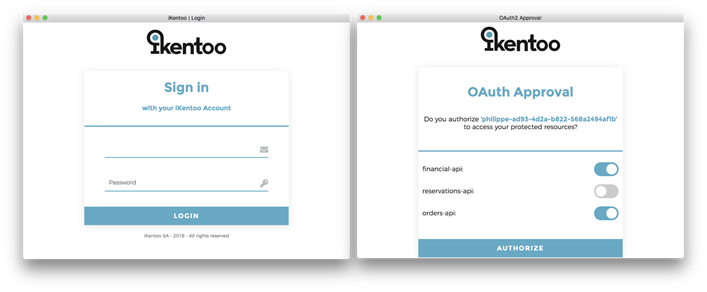
Your URI will then be called with the generated authorization code in the parameter, like this:
Notes: The grant will be linked to that user, that means two important things :
- The integration will have access to all the business locations the user has access to
- If the user’s rights are revoked so are the grants for the third party integration.
Get the access (bearer) token
You need to call our access token URL with a POST method containing the previous authorization code, basic authentication and the same redirect URI.
Trial environment
Example with curl:
|
curl -X POST -d "code=VlWFo0&grant_type=authorization_code&client-id=Your-trial-client-id&redirect_uri=https://mycompany.com/redirection/ikentoo" -H 'authorization: Basic WW91ci10cmlhbC1jbGllbnQtaWQ6WW91ci1jbGllbnQtc2VjcmV0' https://nightswatch-trial.ikentoo.com/oauth/token |
Production environment
Example with curl:
|
curl -X POST -d "code=VlWFo0&grant_type=authorization_code&client-id=Your-client-id&redirect_uri=https://mycompany.com/redirection/ikentoo" -H 'authorization: Basic WW91ci10cmlhbC1jbGllbnQtaWQ6WW91ci1jbGllbnQtc2VjcmV0' https://nightswatch.ikentoo.com/oauth/token |
Notes: “WW91ci10cmlhbC1jbGllbnQtaWQ6WW91ci1jbGllbnQtc2VjcmV0” is an example of base64 encoded trial or production client-id and client-secret. You have to generate yours.
The response is formatted as json. Example:
{"access_token":"31b4cd66-9941-456a-a483-84ffef0942e6","token_type":"bearer","scope":"financial-api"}
The access token will finally be used to call API endpoints with header Authorization: Bearer 31b4cd66-9941-456a-a483-84ffef0942e6
How to encode with basic authentication
Use this website and set the following parameters in the fields:
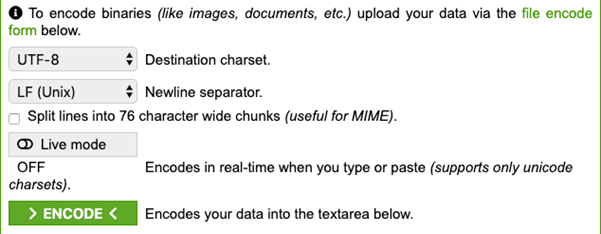
Type your trial or production client-id and client-secret separated with a semicolon and without the brackets (Clientid:clientsecret) and click encode. Use the result in the POST method mentioned above.
Comments
0 comments
Please sign in to leave a comment.