5 Key Things to check
1. Check the ''Light'' by the ''Scan here arrow'' on the scanner indicating that ''power'' is present.
2. Check the ''Dongle'' is firmly plugged in like the picture below
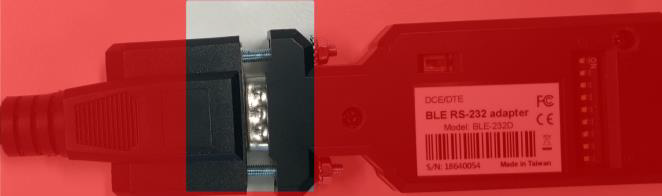
3. Check the ''Dongle'' and ensure the switch is marked to the right as ''DTE'' on mode selection.
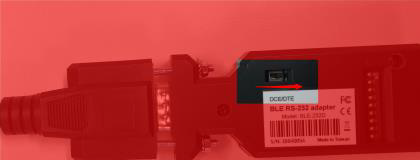
4. Check the scanner is present in the ''Hardware'' > ''Bluetooth Devices'' as shown below.
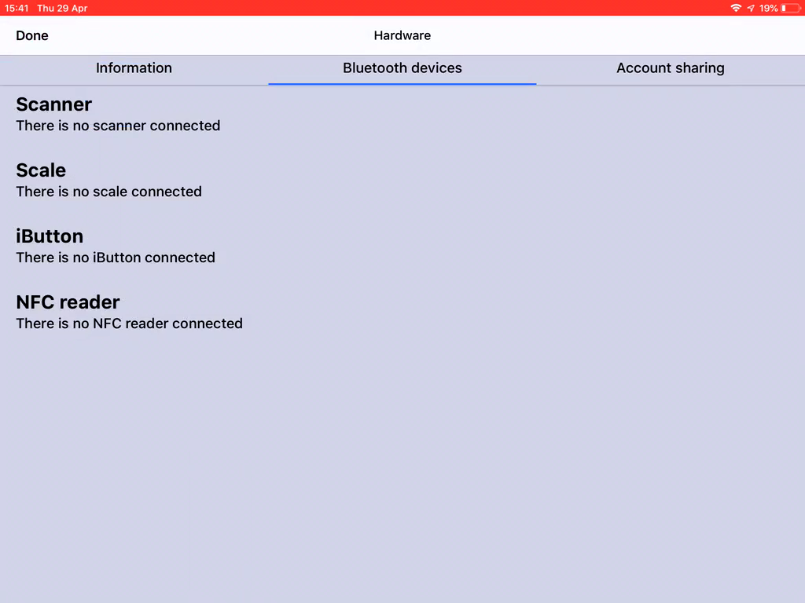
5. Check the scanner ''Beeps'' on Scan.
What to do if my Scanner disconnects?
If you have followed the steps above and you still have an issue, the scanner will only connect on the ''reopening'' of the app. Therefore we recommend you ''double click'' the home button and swipe to close the app, Tap to open and this will trigger the Bluetooth device/ scanner ''prompt'' on which you will need to select ''connect''.
Comments
0 comments
Please sign in to leave a comment.