If you are having issues with account sharing and accessing printers following an upgrade to IOS 14
Please follow the steps below to resolve;
1) Go to Settings App
2) Select Privacy
3) Select Local Network
3) Hospitality OR iKentoo needs to be Activated and "Green" in the below list
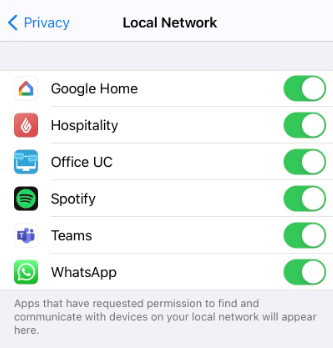
This is because iOS 14 introduces a new system model for authorization called Network Access
When opening of the app after the IOS 14 Installation there is a prompt for access, If the user refuses the Network Access iKentoo v3 or Lightspeed K Series will not be able to connect to local hardware this means both account sharing and printing is directly affected
See Prompt below,
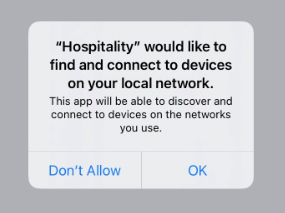
Long term, we are working on a new version that will present the Red Error screen when the user refuses the access and a call to action to activate it in the privacy settings. This will block the use of the app if the user doesn’t accept it.
If you are unable to follow the steps below please contact our helpdesk on 01923 601 820 Option 2
Comments
0 comments
Please sign in to leave a comment.