WiFi Setup
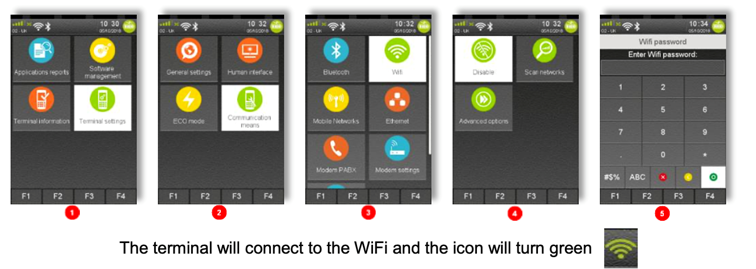
- Press F3 and then select ‘Control Panel’.
- Select ‘Terminal settings’ > ‘Communication Means’ > ‘WiFi’ > ‘Scan Networks’.
- Choose your selected Network and Enter the WiFi Password.
Logon/ TMS Call
- Enter the supervisor menu by pressing the menu button twice, Select ‘Supervisor and press the green button to confirm.
- You will then be asked to enter the supervisor password (Default passwords: 123456 or 01483).
- Press the green button to confirm the password.
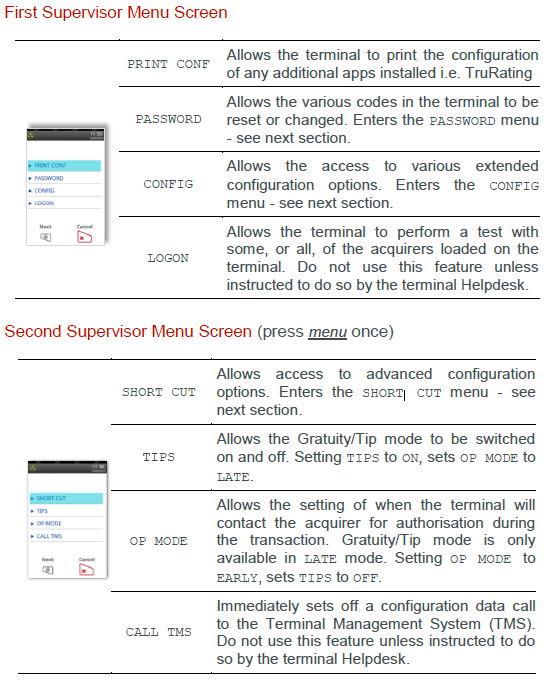
- Once you have access to the Supervisor menus, press the menu key to cycle through the various menu screens.
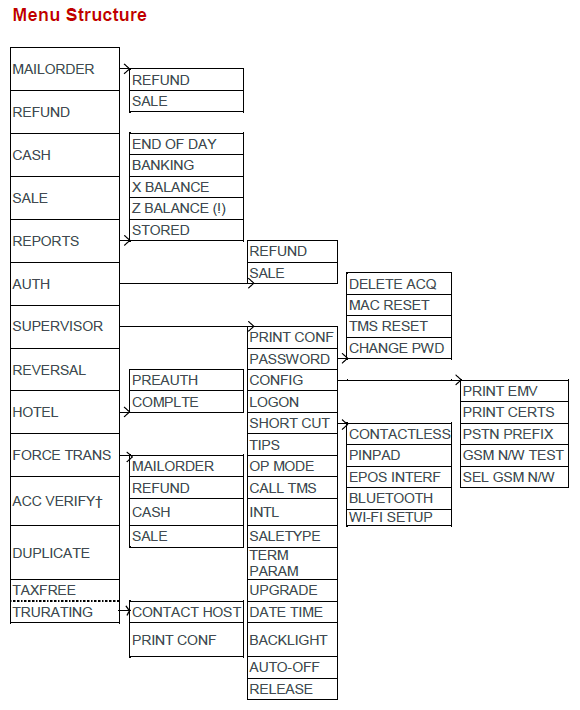
- On the First menu screen you will find the ‘Logon’ option, Press the menu button to be taken to the seconds menu screen. On the second menu screen you will find the ‘Call TMS’ option. (See below screens and menu structure).
Till Mode (Integration)
- Press F4 from the home screen
- Enter password (123456 or 01483 by default) - 'Standalone Mode' will appear on the screen.
- Select Standalone mode OFF (Till mode ON message will pop up)
- Press red cancel button to restart the terminal
Comments
0 comments
Please sign in to leave a comment.