Web extensions
A web extension is a web page that can be linked to a button on the menu of your device. When the button is used, a window shows you the contents of the specified page. You can use variables to pass parameters in the URL to create custom extensions for your needs. Each line of the list is a web extension.

Accessing the web extensions
- Click on "Configuration" at the top of the screen.
- Then select "Settings".
- From the drop-down menu options select "Web extensions".
Note: Web extensions are created in Configuration> Settings> Web extensions and must be enabled in Configuration> Configuration of the devices.
Create a web extension
- Click on "Add a new web extension".
- Enter the required information.
- Save the changes by clicking on the blue "Save" button.
Edit a web extension
- Locate the desired web extension.
- Click on the "Edit" button on the right side of the line corresponding to the web extension.
- Edit the web extension.
- Save the changes by clicking on the blue "Save" button.
Points to Consider
1) If you are using the JavaScript variables from within the Web Extension page please note that these are case sensitive
2) The website you are viewing must have a valid SSL Certificate
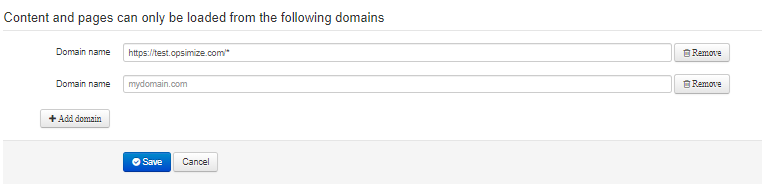
3) When adding Web Extensions its important to consider that you only want to view certain URLs this can be set in the "Content Blocker" below;
Note: Using a * is effectively a wild card and ensures that all pages linked to that domain are accessible
Comments
0 comments
Please sign in to leave a comment.