Background:
The Government VAT reduction to 5% is coming to an end on the the 1st of October 2021 (read more about it here - VAT changes - Gov.uk).
The key information to be aware of is:
-
Items that were previously always 5% and are now 12.5% on all transactions. (Example: Hot food)
-
Items that were previously 5% when eat in and 0% when takeaway, and are now 12.5% when eat in and 0% when take away. (Example: Cold salads)
-
Items that were previously always 5% and are now 12.5% when eat in and 20% when take away. (Example: Carbonated cold drinks)
IMPORTANT:
- If your system is already setup on the 5% VAT, your system will automatically update on the 1st of October 2021 to the 12.5% changes. You will need to reload your tills on Friday morning.
- If you are using an integrated online ordering solution please contact us before making any changes outlined below by calling support on 020 4505 3555
First step, reload and test on Friday:
- On Friday 1st October2021 , the first thing we need you to do is to "Reload” your tills so that the automatic tax change takes effect.
- Enter an item into the Till and check that the VAT rate is applied correctly.
- Then once you have made some sales you can check the following report to ensure that the 12.5% VAT is taking effect, you must make sure it's in-display view "ACCOUNTING VIEW": https://console.ikentoo.com/business/index (keep an eye out for a 12.5% tax column)
If the above is working as expected then there is nothing more for you to do and your system is setup correctly, however, if you spot any issues with specific items we need you to read on below.
- The accounting group that each of your items are in are used to define which tax rate to apply to it and hence you need to "CHECK" the tax profiles for the affected accounting groups by going to https://console.ikentoo.com/items/groups
- Select the "Accounting Group" you wish to amend by clicking "Edit" on the right-hand side
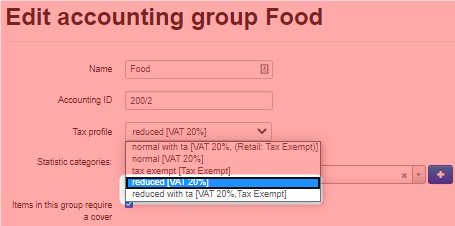
- You must change the tax profile to "reduced" for groups where the items fall into example (A) above, "reduced with ta" for groups where the items fall into example (B) above and "reduced except ta" for groups where the items fall into example (C). See above 'Key information to be aware of' and see image below.
- Be sure to reload all devices after you've made the necessary changes by going to https://console.ikentoo.com/configuration/devices. (You can also reload the device directly on the iPad by going to the functions menu in the top right of the menu screen.)
Comments
0 comments
Please sign in to leave a comment.