The K Series cover value can be difficult to find a correlation with your reports. This is because K Series cover value is only calculated using tables that have a "cover" attached. Therefore any direct sales or sales with 0 covers are not included in the daily calculation.
To find this you can do the following;
Step 1) Export all receipts on the day in question
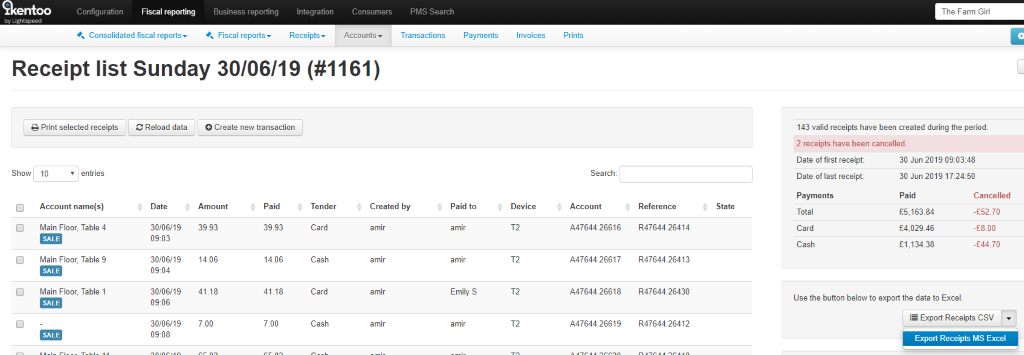
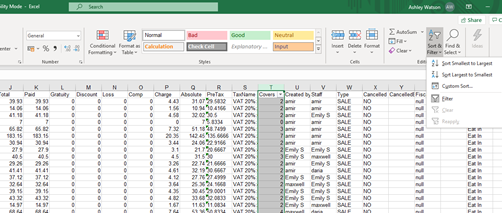
Step 2) Export into XLS so you can select and filter the column with "Cover Value" filter all the "0s" and hide them as below
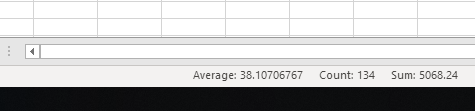
Step 3) Select the ‘Paid’ Column and in the bottom right of excel you will see a ‘Sum’. This is the figure that is use the work out the average cover value.
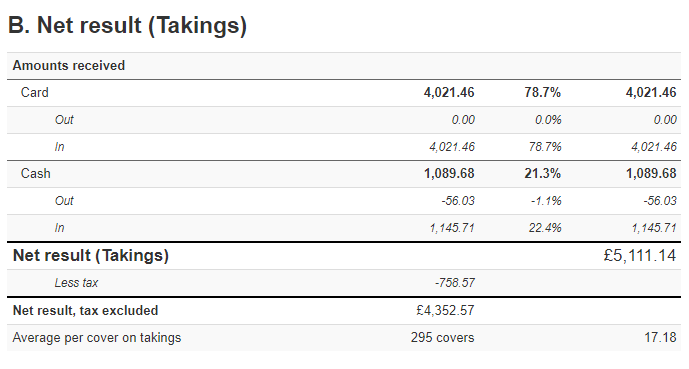
Step 4) You will then need to divide this total paid figure by the number of covers. See example screenshots the calculated figure matches the Average cover value showing on K Series
Calculation is 5068 / 295 = 17.18
Comments
0 comments
Please sign in to leave a comment.